Adafruit Circuit Playground Express
Educational microcontroller board with built-in sensors and NeoPixels
🔲 See This Board in Action
This board is featured in our interactive size comparison.
Overview
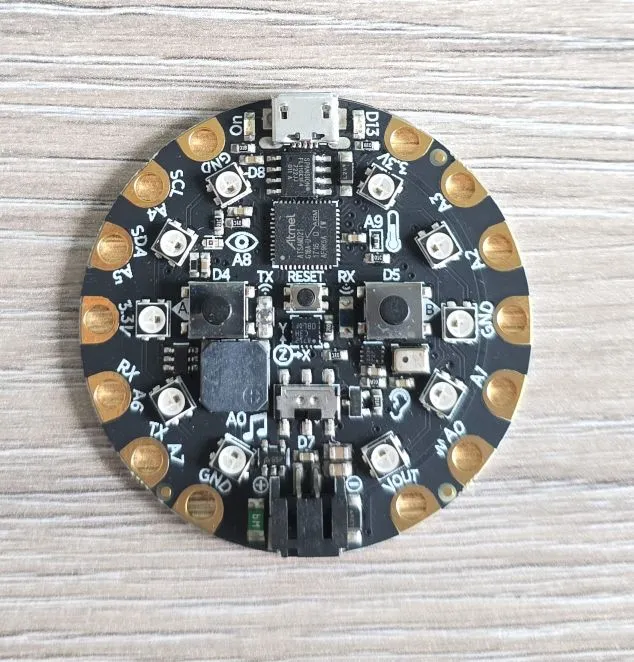
The Adafruit Circuit Playground Express is an all-in-one educational microcontroller board designed to make electronics and programming accessible to beginners while providing enough capability for advanced projects. It features numerous built-in sensors, LEDs, buttons, and a speaker, all on a single round PCB that’s perfect for wearables and interactive projects.
Hardware Features
- Microcontroller: ATSAMD21 ARM Cortex M0+ Processor
- Clock Speed: 48 MHz
- Operating Voltage: 3.3V
- Flash Memory: 2 MB SPI Flash storage
- Built-in Components:
- 10 × RGB NeoPixel LEDs - Individually addressable, full color
- 1 × Motion Sensor - LIS3DH triple-axis accelerometer with tap/free-fall detection
- 1 × Temperature Sensor - Thermistor
- 1 × Light Sensor - Phototransistor (can detect color and pulse)
- 1 × Sound Sensor - MEMS microphone
- 1 × Mini Speaker - 7.5mm magnetic speaker/buzzer with Class D amplifier
- 2 × Push Buttons - Labeled A and B
- 1 × Slide Switch - On/off switch
- Infrared TX/RX - Receiver and transmitter for remote control and proximity sensing
- Green “ON” LED - Power indicator
- Red “#13” LED - Standard blinky LED
- Reset Button
- I/O Pins:
- 8 × Alligator-clip friendly pads
- I2C support
- UART support
- 8 pins with analog input capability
- Multiple PWM outputs
- 7 pads with capacitive touch input
- 1 true analog output pad
- USB: Micro-USB port for programming and debugging
- Can emulate serial port, keyboard, mouse, joystick, or MIDI device
- Power: USB or 3 × AAA battery pack (sold separately)
- Form Factor: Round PCB, 2” (50mm) diameter
- Mounting: 4 mounting holes for securing
The Circuit Playground Express uses the ATSAMD21 (ARM Cortex-M0+) microcontroller, which is not supported by ESPHome.
Built-in Sensors and Components
- NeoPixel LEDs (10×)
- Accelerometer (LIS3DH)
- I2C address: 0x19
- Temperature Sensor
- Light Sensor
- Ambient light detection
- Can also function as:
- Color sensor (with NeoPixels)
- Pulse sensor (heart rate monitoring)
- Sound Sensor (MEMS Microphone)
- Not for voice recording
- Speaker
- 7.5mm magnetic speaker
- Plays tones and simple melodies
- Class D amplifier
- Volume control in software
- Infrared TX/RX
- Send and receive IR signals
- Compatible with TV remotes
- Proximity sensing capability
- Buttons and Switch
- 2x Programmable input buttons
- 1x Slide Switch
- 1x Reset Button
Pin Layout
The Circuit Playground Express has 8 main pads around the edge, all alligator-clip friendly:
| Pad | Functions | Notes |
|---|---|---|
| A0 | Analog In, PWM, Capacitive Touch | Audio output capable |
| A1 | Analog In, PWM, Capacitive Touch | |
| A2 | Analog In, PWM, Capacitive Touch | |
| A3 | Analog In, PWM, Capacitive Touch | |
| A4 | Analog In, PWM, Capacitive Touch, I2C SDA | |
| A5 | Analog In, PWM, Capacitive Touch, I2C SCL | |
| A6 | Analog In, PWM, Capacitive Touch, TX | UART TX |
| A7 | Analog In, PWM, Capacitive Touch, RX | UART RX |
Additional Pads
- GND (3 pads) - Ground connections
- 3.3V - 3.3V power output
- VOUT - Battery voltage output
Capacitive Touch
7 of the 8 pads (A1-A7) support capacitive touch sensing:
- Touch with finger to trigger
- No button press needed
- Can sense through thin materials
- Great for interactive projects
- Works with conductive materials (fruit, water, foil)
Power Options
USB Power
- 5V from Micro-USB port
- Most common for development
- Can power all features
Battery Power
- LiPo battery or 3 × AAA battery pack
- Connects to JST connector on back
- Portable operation
- Battery voltage available on VOUT pad
- Slide switch controls power
Power Considerations
- Current draw with all NeoPixels on: ~200mA
- Typical usage: 20-50mA
- Sleep mode: Available but varies by programming method
Other Photos
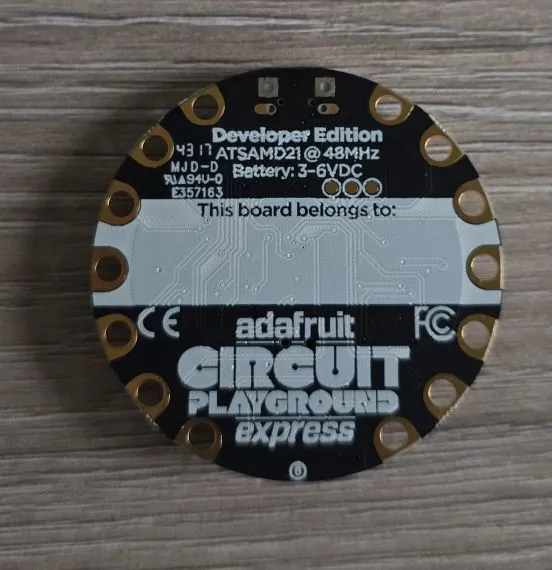
Back of the board: